
PuriFi Research · Smart-TV Privacy
The Goddess In Your Living Room
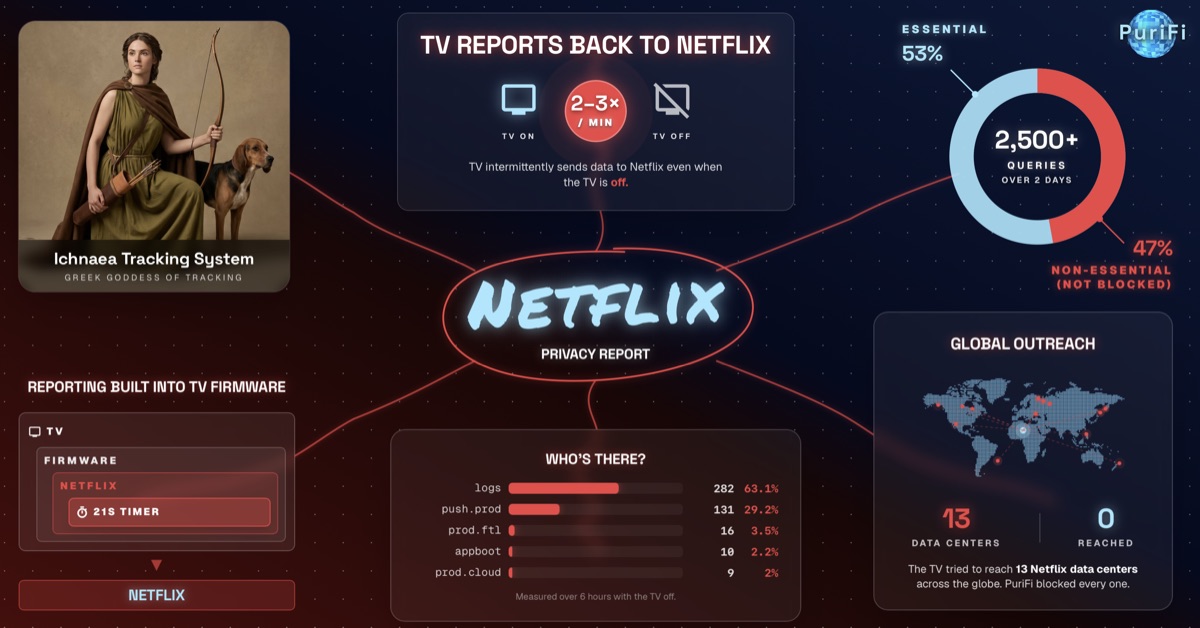
Ichnaea — the Greek goddess of tracking. That’s what Netflix named their tracking system. She lives inside of your television, and she reports to Netflix hundreds of times a day.
At three in the morning on a Tuesday in south Florida, a television sat dark in an empty living room. Its screen had not been on for several hours. Its owner was asleep down the hall. And in the time it took you to read this sentence, the television reported to Netflix two times.
Over the course of two days on a home network with a smart TV, we counted over 2,500 separate calls from that one television to Netflix’s servers — almost half of which were for logging and tracking.
We weren’t the only ones watching the TV.
TV Reports Back to Netflix
2–3×
/ min
TV intermittently sends data to Netflix even when the TV is off.
The platform you never agreed to
The clock is called NRDP — the Netflix Ready Device Platform — and it is not an app. It is firmware. Manufacturers embed it beneath the operating system of smart TVs. You cannot disable NRDP. You cannot uninstall it. There is no settings menu, no toggle, no opt-out. You agreed to it when you bought the device.
You don’t have to have an account. The app does not have to be open. It doesn’t even have to be manually installed, as it comes preinstalled on the TV. The screen does not even have to be on. Between midnight and 8 AM, when everyone was asleep, the same TV sent data to Netflix over 600 times.
Reporting Built Into TV Firmware
tvTV
Firmware
Netflix
21s Timer
Calls the TV sent to Netflix each hour between midnight and 8 AM.
Descriptive vocabulary
The subdomains Netflix uses give us a hint at what they might be used for. All we know is that data is being collected and sent back to Netflix that is not essential to the streaming service we signed up for. What that data is, only they know.
Over two days on one home network — before installing PuriFi — out of roughly 2,700 calls from a single television to Netflix’s servers, the most frequent were these:
The Split
2,684 calls from one TV to Netflix, over two days
2,684
calls
Measured over two days with normal usage patterns.
logs.netflix.com — 1,033 calls in two days, and it fires in odd intervals. Usually every 21 seconds for about five minutes, then a 10-to-15 minute break before it starts again. This happens whether the TV is on or off, whether you’re watching Netflix or something else. Data is being logged — but what, and why?
customerevents.netflix.com — 109 calls. Events about the customer.
ichnaea.netflix.com — 112 calls. And this is the one that gives it away.
Ichnaea, in Greek, means the tracker — from íkhnos, a footprint or a trail. “She who follows the track.” The Greeks used the word for the one who could follow any trail to its end. Netflix named a subdomain after her.

Ichnaea Tracking System
Greek Goddess of Tracking
We are not making this up. We do not have to.
Global outreach
On one night the TV did something interesting. It reached out to thirteen Netflix data centers scattered across the globe: Virginia, Ohio, Oregon, Mexico, São Paulo, Dublin, London, Frankfurt, Spain, Tokyo, Osaka, Bangkok, and Sydney.
Netflix already knows your approximate location from your IP address. So why would a television on the east coast of the United States need to measure how far it is from Sydney? Routing you to the nearest, fastest server doesn’t require pinging the other side of the planet.
Global Outreach
13
Data Centers
0
Reached
The TV tried to reach 13 Netflix data centers across the globe. PuriFi blocked every one.
It fired all thirteen probes at once. But because PuriFi was already blocking unnecessary communications, none of them ever reached a data center. The TV fell into a retry loop, firing the same sweep again every 21 seconds for the next five minutes before it gave up and never came back. Netflix kept working without interruption the whole time. Which tells us one thing: whatever those probes were for, they weren’t necessary.
Our Privacy Grade
Graded on three published criteria — frequency, consent, and ability to opt out.
In our opinion, Netflix fails on every count that matters — reporting without your knowledge, consent, or any way to stop it.
Not just the television
The television is the loudest of them, but it is not the only one. Every Netflix-aware device in the house dialed home in its own voice. iOS, Android, and Apple TV all do the same — just at smaller volumes. None of it is visible to you. Nobody could see it and nobody could turn it off.
How can you protect yourself?
Three existing solutions
DIY
Cost$$$DifficultybuildbuildbuildFeaturesstarstarstarYou can build something yourself. Pi-hole is excellent open-source software — it isn't what PuriFi runs, but it's the DIY answer to the same problem, and a fresh install is a starting point, not a finished product. Out of the box there are no blocklists, no mobile app, no protection once you leave home, and no recursive DNS. You source the hardware, flash it, add and maintain your own blocklists, configure your network, and keep all of it updated yourself. It saves money — but only a small slice of people have the time and skill to assemble it and keep it running.
Firewalls
Cost$$$DifficultybuildbuildbuildFeaturesstarstarstarThere is no product out there built specifically for this. The closest thing is buying an expensive firewall — and you either install and configure it yourself, or pay an IT guy to come do it for you. Even then, the blocklists won’t update automatically, you often have to pay a monthly subscription, the protection doesn’t follow you away from home, and there is no user-friendly interface to manage any of it.
PuriFi
Cost$$$DifficultybuildbuildbuildFeaturesstarstarstarPuriFi is a tiny device that plugs into your router and protects every device on your network — your TV, your phone, your laptop, your speakers, all of it. It sits between your home and the internet, filtering every request and blocking ads, trackers, and surveillance like Netflix’s before it ever leaves the house. No software to install. No settings to configure. You plug it in, pair it from the app, and you’re done in under two minutes.
Essential
39%
61%*
Non-Essential
(Blocked)
26,800
queries
over 9 days
*Blocking queries can trigger retry loops, which inflates the number of non-essential calls.
We then ran the same household for nine days with PuriFi installed. Over that period it blocked 61% of Netflix’s communication attempts. The streaming itself was untouched. Login worked. Recommendations worked. The service that delivers the actual show worked. What did not work were the logs, the location probes, the customer-event logs, and the goddess in the TV’s firmware.
Netflix could no longer reach her.
This is the first in a series of measurements PuriFi will publish over the coming months. If you would like to be measured next, reach us at research@purifi.io.
Netflix is a registered trademark of Netflix, Inc. PuriFi is not affiliated with, endorsed by, or sponsored by Netflix.
